Introduction
The Gimkit dashboard is the control center that makes using Gimkit simple, organized, and enjoyable for both teachers and students. Whether you’re creating interactive quizzes, checking student progress, or managing multiple classes, everything begins from the dashboard. Its clean layout and easy navigation help users spend less time figuring out where things are and more time focusing on learning.
If you’re new to Gimkit, the dashboard may seem packed with different options at first. However, after spending just a few minutes exploring it, you’ll notice that everything is arranged logically. Teachers can build Kits, assign homework, host live games, and review reports, while students can quickly join games and complete assignments when given access.
This guide explains everything you need to know about the Gimkit dashboard. We’ll cover its main features, how to navigate it efficiently, and practical tips that can help you get the most out of this powerful educational platform.
What Is the Gimkit Dashboard?
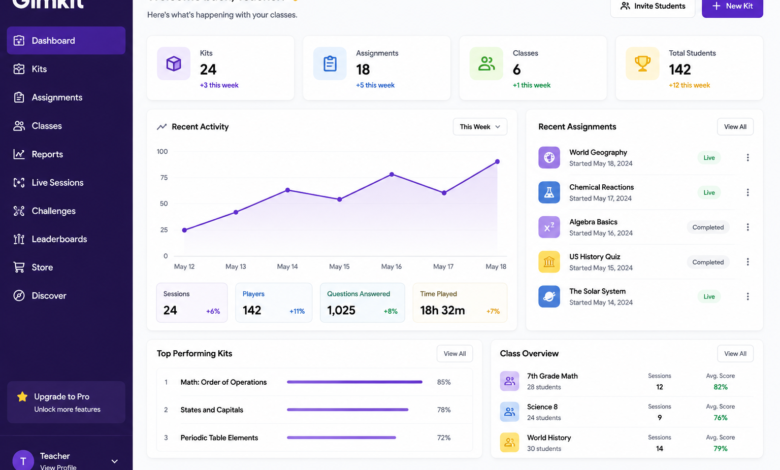
The Gimkit dashboard is the main interface users see after logging into their account. Think of it as your personal workspace where every important tool is available in one place. Instead of jumping between multiple pages, you can manage your classroom activities directly from this central hub.
For teachers, the dashboard serves as a complete classroom management system. It allows you to create question sets known as Kits, organize classes, assign homework, host live games, and review detailed reports about student performance. Having all these features together saves valuable time during lesson planning.
Students experience a simpler version of the dashboard. Depending on their teacher’s settings, they may see assigned activities, completed work, and opportunities to join live games. This streamlined approach keeps students focused on learning without overwhelming them with unnecessary options.
Main Features of the Gimkit Dashboard
One of the biggest strengths of the Gimkit dashboard is its collection of practical features. Every section has a specific purpose, making it easy to manage classroom activities without confusion.
The Kits section allows teachers to build custom quizzes on virtually any topic. Questions can include multiple-choice answers, images, and other engaging elements. Teachers can also import existing content instead of creating every question from scratch, which significantly reduces preparation time.
Another useful feature is the Classes section. Here, teachers can organize students into different groups, making it much easier to assign activities to the correct class. This organization becomes especially valuable for educators managing multiple courses throughout the school year.
The Reports area provides valuable insights into student performance. Instead of simply showing scores, it highlights strengths, weaknesses, and areas that may require additional instruction. This data helps teachers make informed decisions when planning future lessons.
How to Navigate the Gimkit Dashboard Efficiently
Learning to navigate the Gimkit dashboard doesn’t take long because the interface is designed with simplicity in mind. Most tools are accessible from the main menu, allowing users to switch between sections without unnecessary clicks.
The homepage typically displays your recent activities, saved Kits, active assignments, and shortcuts to frequently used tools. Keeping these important features front and center allows teachers to begin working immediately after signing in.
Using folders and clear naming conventions for your Kits can make navigation even easier. For example, labeling quizzes by subject and grade level prevents confusion later, especially if you’ve created dozens of activities over time.
Regularly reviewing your dashboard also helps you stay organized. Deleting outdated assignments, archiving old content, and updating classes keeps your workspace clean and ensures students always see the most relevant materials.
Benefits of Using the Gimkit Dashboard
The biggest benefit of the Gimkit dashboard is efficiency. Teachers can perform nearly every classroom management task without switching between multiple applications. This streamlined workflow saves time that can be spent on instruction instead of administrative work.
Student engagement is another major advantage. Since Gimkit combines learning with game mechanics, students often participate more actively than they would with traditional worksheets. The dashboard makes launching these activities quick and hassle-free.
The platform also encourages data-driven teaching. Instead of relying solely on classroom observations, teachers receive detailed reports showing which concepts students understand and which topics require additional review. This information supports more effective lesson planning.
Tips for Getting the Most Out of the Gimkit Dashboard
Taking full advantage of the Gimkit dashboard begins with keeping your content organized. Creating folders for different subjects or semesters makes locating Kits much faster as your library grows.
Experimenting with different game modes is another excellent strategy. Gimkit frequently offers creative ways to present quizzes, helping maintain student interest throughout the academic year. Rotating between game modes keeps classroom activities feeling fresh rather than repetitive.
It’s also helpful to review reports after each assignment. Looking at performance trends allows teachers to identify common mistakes early and adjust instruction before misconceptions become larger learning obstacles.
Finally, don’t hesitate to update your Kits regularly. Adding new questions, improving existing ones, or replacing outdated content ensures your classroom materials remain accurate and engaging for every new group of students.
Common Challenges and How to Solve Them
Although the Gimkit dashboard is user-friendly, beginners sometimes experience a learning curve. The number of available features may initially seem overwhelming, but focusing on one section at a time makes the platform much easier to understand.
Occasionally, users may have trouble locating older Kits or assignments. Developing a consistent naming system and organizing content into folders helps eliminate this problem before it becomes frustrating.
Internet connectivity can also affect the experience during live games. A stable connection, updated browser, and refreshed page usually resolve most technical issues quickly. Preparing your classroom devices before a session can reduce interruptions and create a smoother experience for everyone involved.
Why Teachers and Students Appreciate the Gimkit Dashboard
Teachers appreciate the Gimkit dashboard because it simplifies many daily classroom responsibilities. Instead of juggling multiple educational tools, they can create activities, monitor progress, assign homework, and analyze results from one convenient location.
Students enjoy the dashboard because it provides a straightforward path to their assignments and games. They don’t have to navigate through complicated menus, allowing them to focus on participating and learning rather than figuring out how the platform works.
The balance between simplicity and functionality is one of Gimkit’s greatest strengths. New users can begin using basic features almost immediately, while experienced educators can take advantage of more advanced tools to enhance their teaching strategies.
Conclusion
The Gimkit dashboard is much more than a homepage—it’s the foundation of the entire Gimkit experience. With its organized interface, powerful classroom management tools, detailed reporting, and engaging learning features, it helps teachers save time while creating more interactive lessons for students.
Whether you’re creating your first Kit, hosting a live classroom game, assigning homework, or reviewing student progress, the dashboard provides everything you need in one place. Its intuitive design makes it accessible for beginners while still offering enough functionality for experienced educators.
As digital learning continues to evolve, platforms like Gimkit demonstrate how technology can make education more engaging without becoming overly complicated. By understanding how the Gimkit dashboard works and using its features consistently, teachers can create better learning experiences, improve classroom organization, and help students stay motivated throughout the school year.
You May Also Read: TechBullion