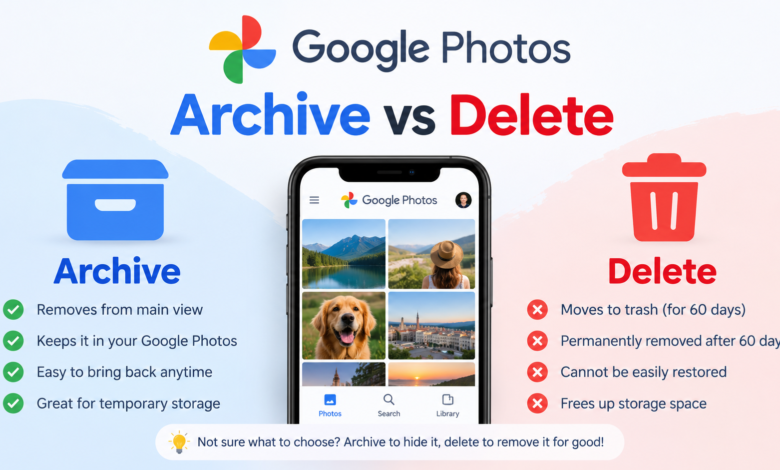
If you use Google Photos regularly, you have probably noticed options such as Archive and Delete when managing your pictures and videos. At first, these options can seem similar because both can make a photo disappear from the main view. However, they work very differently, and choosing the wrong one can lead to an unwanted photo being removed permanently.
Understanding Google Photos archive vs delete is especially important if you have years of personal photos, screenshots, receipts, downloaded images, or videos stored in your account. Archive is mainly designed to keep certain photos out of your everyday photo grid while still keeping them available. Delete, on the other hand, is intended for photos and videos you no longer want to keep.
In this guide, we will explain the difference between Google Photos Archive and Delete in simple language. You will learn what happens when you archive a photo, what happens when you delete one, whether archived photos remain in your account, and when you should use each option.
What Is Google Photos Archive?
The Archive feature in Google Photos is designed for photos and videos that you want to keep but do not necessarily want to see in your main Photos view. When you archive an item, it is moved out of the regular photo grid, making your collection look cleaner and easier to browse.
For example, imagine that your Google Photos library contains hundreds of screenshots, documents, old memes, or pictures of things you wanted to remember temporarily. You may not want to delete these files because they could still be useful later. Instead, you can archive them so they are no longer mixed with your favorite memories.
Archiving does not mean that Google Photos has thrown the photo away. The photo remains stored in your Google Photos Archive vs Delete Photos account and can still be accessed through the Archive section. You can also unarchive an item later if you decide that you want it back in your normal Photos view.
What Happens When You Archive a Photo?
When you archive a photo in Google Photos Archive vs Delete Photos, the most noticeable change is that it is removed from the main Photos view. This can make your library much easier to organize, particularly if you have many images that you do not want constantly appearing while scrolling through your memories.
An archived photo is still available in your Google Photos account. You can normally find it by opening Google Photos Archive vs Delete Photos and going to the Archive section. From there, you can view your archived content and choose to unarchive individual items whenever you want.
Another important point is that archiving is not the same as hiding a file from every possible place in Google Photos. Depending on the type of photo and how Google Photos Archive vs Delete Photos organizes your library, an archived item may still appear in certain search results, albums, or other areas. Archive should therefore be thought of as an organization feature rather than a privacy or security feature.
What Does Delete Mean in Google Photos?
The Delete option has a much more serious purpose. When you delete a photo or video from Google Photos Archive vs Delete Photos, you are telling the service that you no longer want that item stored as part of your photo library. Deleted items are generally moved to the Trash before they are permanently removed.
This temporary Trash period gives you an opportunity to recover a photo if you accidentally deleted it. However, users should not assume that deleted photos will remain recoverable forever. Once the applicable Trash retention period ends, the item may be permanently deleted.
Deleting can be useful when you are removing duplicate photos, blurry pictures, unwanted screenshots, accidental camera shots, or other files you genuinely no longer need. It is also important to understand that deleting an item can have consequences beyond simply removing it from your main photo grid.
Before deleting something important, always make sure you have another copy if you may need it later. This is particularly important for family photographs, travel memories, work documents, and other irreplaceable files.
Google Photos Archive vs Delete: The Main Difference
The easiest way to understand Google Photos archive vs delete is to think about your reason for removing the photo from view.
Archive means, “I want to keep this, but I do not want it cluttering my main Photos view.” Delete means, “I no longer want to keep this photo or video.”
An archived item remains part of your stored collection, while a deleted item is sent toward removal through the Trash system. This makes Archive the safer choice when you are unsure whether you will need a photo again.
Here is a simple comparison:
| Feature | Archive | Delete |
|---|---|---|
| Removes item from main Photos view | Yes | Yes |
| Keeps the item in Google Photos | Yes | Temporarily in Trash |
| Can be restored easily | Yes | Yes while it remains in Trash |
| Intended for organization | Yes | No |
| Intended for permanent removal | No | Yes |
| May help reduce visual clutter | Yes | Yes |
| Should you use it when unsure? | Yes | No |
The biggest takeaway is simple: Archive is for keeping; Delete is for removing.
Does Archiving Save Storage Space?
One common misunderstanding about Google Photos Archive is that it can free up storage space. In most cases, archiving a photo does not reduce the amount of Google Photos Archive vs Delete account storage used by that photo.
The reason is straightforward. Archive changes how the item is organized and displayed; it does not remove the underlying file from your account. If you have a large collection of high-resolution photos and are trying to free up storage, simply archiving them will not solve the problem.
If storage management is your main goal, you need to look at other options, such as deleting unnecessary files or using Google Photos Archive vs Delete Photos’ storage management tools. Before deleting anything, however, check whether the files are important and whether you have backups.
This distinction is important because someone might archive hundreds of photos expecting their storage usage to decrease. Afterward, they may discover that their Google Photos Archive vs Delete account still uses roughly the same amount of storage. Archive is primarily an organization tool, not a storage-cleanup tool.
Does Deleting Photos Free Up Google Storage?
Deleting photos can eventually help reduce the storage used by your Google Photos Archive vs Delete account, but the exact effect depends on the circumstances and the status of the deleted items. Photos that have only been moved to Trash may continue to occupy storage until they are permanently deleted.
This means that deleting a large number of photos does not necessarily mean your available storage will immediately increase. You may need to empty the Trash if you are certain that you no longer need those files.
However, permanent deletion should be treated carefully. Once an item has been permanently removed, recovering it may not be possible. For this reason, it is a good idea to review your Trash before permanently clearing it.
If your Google Photos Archive vs Delete storage is almost full, using Google’s storage management features can help identify large videos, blurry photos, screenshots, and other unnecessary items. This approach is usually safer than randomly deleting files from your library.
Can You Unarchive Photos in Google Photos?
Yes, you can generally unarchive photos when you decide that they should appear in your regular Photos view again. This makes Archive particularly useful because it is not a one-way action.
For instance, you might archive old screenshots today because you do not want them cluttering your main library. Six months later, you may need one of those screenshots. You can open your Archive, find the image, and unarchive it.
This flexibility is one of the biggest advantages of Archive. You can organize your collection without making a permanent decision about whether a photo should exist in your account.
For people who frequently change how they organize their photo libraries, Archive can be a much better option than Delete. It provides a simple way to separate less-important visual content from the photos you want to see most often.
Can You Recover Deleted Photos?
Deleted photos may be recoverable while they are still in Google Photos Archive vs Delete Photos Trash. The Trash system is designed to provide a safety window for users who accidentally remove something.
However, recovery is not something you should rely on indefinitely. Once a deleted item is permanently removed from Trash, it may no longer be recoverable through Google Photos Archive vs Delete Photos. The exact retention behavior can also depend on the type of content and Google’s current policies.
If you accidentally delete an important picture, check the Trash as soon as possible. The sooner you notice the mistake, the better your chances of recovering the item.
This is another reason why Archive can be useful when you are uncertain. If you simply want to get something out of your main library, there is usually no reason to take the risk of deleting it.
When Should You Use Archive?
Archive is best when you want to keep a photo but reduce clutter. There are many situations where this makes sense.
Screenshots are a good example. Your phone may automatically back up dozens of screenshots that you rarely want to see while browsing your memories. Instead of deleting them, you can archive the ones you may need later.
Archive can also work well for documents, temporary reference images, receipts, old social media images, memes, and other content that you want to retain without allowing it to dominate your main photo timeline.
Another good reason to use Archive is uncertainty. If you find yourself thinking, “I probably do not need this, but I might someday,” Archive is generally the safer choice than Delete.
When Should You Use Delete?
Delete is appropriate when you are confident that a photo or video is no longer useful. Examples include duplicate images, accidental shots, extremely blurry pictures, unwanted downloads, and outdated screenshots.
You may also use Delete when you are deliberately cleaning up your Google Photos Archive vs Delete Photos storage. In that situation, reviewing large files and unnecessary videos can help you make meaningful progress.
The important thing is to avoid using Delete simply because you do not want to see something in your main library. If visibility is the only problem, Archive is usually the more suitable option.
Before deleting important personal photographs, consider whether they exist anywhere else. A cloud backup, computer copy, external drive, or another trusted storage location can provide additional protection against accidental loss.
Is Archive Better Than Delete?
Neither option is universally better because they solve different problems. Archive is better for organization, while Delete is better for permanent cleanup.
If you have a photo that you want to keep but rarely need to see, Archive makes sense. If you have a photo that you genuinely do not want anymore, Delete is the logical choice.
A useful rule is to ask yourself one question before selecting an option: “Would I be upset if I could never get this photo back?” If the answer is yes or even maybe, consider archiving it instead of deleting it.
This simple approach can prevent many accidental deletions and help you maintain a cleaner Google Photos Archive vs Delete Photos library without sacrificing valuable memories.
How to Organize Google Photos Without Losing Important Pictures
A good Google Photos Archive vs Delete Photos organization strategy does not require deleting everything you rarely look at. Instead, separate your content based on its importance and usefulness.
Keep meaningful memories easily accessible, archive less-important material that you still want to retain, and delete files that are genuinely unnecessary. This creates a much cleaner library without forcing you to make permanent decisions about every image.
It is also worth periodically reviewing screenshots, duplicate images, videos, and downloaded files. These categories can grow quickly, especially if you use your phone for work, shopping, social media, or everyday tasks.
Most importantly, do not rush through cleanup. A few extra minutes reviewing a photo before deleting it can save you from losing something valuable later.
Google Photos Archive vs Delete: Frequently Asked Questions
Is Archive the same as Delete in Google Photos?
No. Archive hides an item from the main Photos view while keeping it in your Google Photos Archive vs Delete Photos collection. Delete moves the item toward removal through Trash and can eventually result in permanent deletion.
Do archived photos still take up storage?
Generally, yes. Archiving changes how a photo is organized and displayed, but it does not normally remove the file from your account’s storage.
Can I get an archived photo back?
Yes. You can access archived photos and typically unarchive them so they return to the normal Photos view.
Can deleted photos be recovered?
Deleted photos may be recoverable while they remain in Trash. Once they are permanently deleted, recovery may no longer be possible.
Should I archive or delete old photos?
If you still want to keep the photos but do not want them cluttering your main library, Archive is usually the better choice. If you are completely sure you no longer need them, Delete may be appropriate.
Final Thoughts on Google Photos Archive vs Delete
Understanding Google Photos archive vs delete can make managing your photo library much easier. Although both options can remove an image from your main Photos view, their purposes are very different.
Archive is essentially an organization tool. It lets you keep photos while moving them away from your everyday timeline. Delete is a cleanup tool for photos and videos you no longer want to retain. Deleted items may remain temporarily in Trash, but permanent deletion can eventually make them unrecoverable.
When in doubt, think twice before deleting. If your goal is simply to make your Google Photos Archive vs Delete Photos library cleaner, Archive is often the safer choice. If your goal is to remove unnecessary files and potentially reclaim storage, carefully reviewing and deleting unwanted content is more appropriate.
The best Google Photos Archive vs Delete Photos library is not necessarily the one with the fewest photos. It is the one that is organized, easy to navigate, and protected from accidental loss. Once you understand the difference between Archive and Delete, you can clean up your collection with much more confidence.