Introduction
If you’ve ever wished spreadsheets could be as visually appealing as your presentations or social media graphics, Canva Sheets might be exactly what you’ve been waiting for. Traditional spreadsheet tools are excellent for calculations and data management, but they often lack the creativity needed for presentations, reports, and visual storytelling. Canva has changed that by introducing a spreadsheet experience that combines data organization with powerful design capabilities.
Whether you’re a business owner, marketer, student, teacher, or freelancer, Canva Sheets helps you organize information while making it look professional. Instead of switching between multiple applications to create charts, reports, and presentations, you can manage everything within Canva’s creative ecosystem. This saves time and makes collaboration much easier.
In this guide, we’ll explore everything you need to know about Canva Sheets, including its features, benefits, practical uses, collaboration tools, and tips for getting the most out of it. By the end, you’ll understand why so many creators and professionals are adding Canva Sheets to their daily workflow.
What Is Canva Sheets?
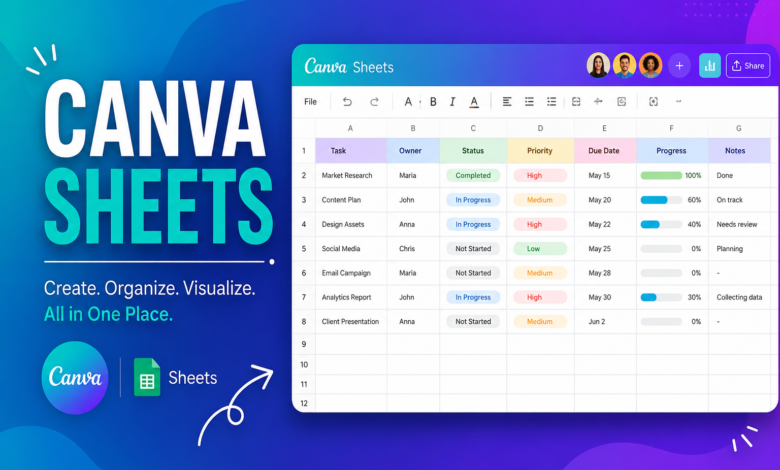
Canva Sheets is a spreadsheet tool built into Canva that combines traditional data management with modern visual design. Unlike conventional spreadsheet software that focuses primarily on numbers and formulas, Canva Sheets allows users to organize data while seamlessly turning it into beautiful charts, reports, presentations, and visual content.
One of the biggest advantages of Canva Sheets is that it connects directly with Canva’s design tools. This means you don’t need to export your spreadsheet into another application to create infographics or presentations. Everything stays in one workspace, making the entire process much faster and more efficient.
Another reason users appreciate Canva Sheets is its beginner-friendly interface. Even if you’ve never used advanced spreadsheet software before, you’ll likely find Canva’s layout intuitive. The platform focuses on simplicity without sacrificing the features needed for everyday tasks.
Key Features of Canva Sheets
One standout feature of Canva Sheets is its clean and visually appealing interface. Instead of overwhelming users with endless menus and complex options, Canva organizes everything in a way that’s easy to understand. This allows beginners and professionals alike to work comfortably.
Another impressive feature is the ability to transform spreadsheet data into attractive charts and graphics. Since Canva is already known for its design capabilities, users can customize colors, fonts, icons, and layouts without needing graphic design experience. This makes reports look far more engaging than standard spreadsheets.
Collaboration is another area where Canva Sheets shines. Team members can edit documents together, leave comments, and share updates in real time. Whether you’re working on marketing campaigns, financial planning, classroom projects, or business reports, everyone stays on the same page without constantly sending updated files back and forth.
Benefits of Using Canva Sheets
One major benefit of Canva Sheets is improved productivity. Since your spreadsheet and design tools exist within the same platform, you spend less time switching between applications. This streamlined workflow allows you to complete projects faster while maintaining consistency across all your documents.
Another advantage is professional presentation. Data becomes much easier to understand when it’s displayed using visually appealing charts, color-coded tables, and branded layouts. Businesses can create reports that impress clients, while educators can prepare materials that capture students’ attention.
Accessibility is another strength of Canva Sheets. Because Canva is cloud-based, your work is available from virtually anywhere with an internet connection. Whether you’re using a desktop, laptop, or tablet, your spreadsheets remain synchronized across devices, making remote work much more convenient.
How Canva Sheets Helps Different Users
Business owners can use Canva Sheets to track sales, inventory, budgets, and project timelines. Since the information can quickly be converted into presentations or dashboards, meetings become more productive and visually engaging. Small businesses especially benefit because they don’t need multiple software subscriptions.
Students and teachers also gain significant advantages from Canva Sheets. Teachers can organize attendance, lesson plans, and grading while creating visually attractive classroom materials. Students can manage assignments, research data, and group projects in a workspace that encourages creativity and organization.
Content creators and marketers often rely on Canva Sheets to manage editorial calendars, campaign performance, social media schedules, and content planning. Because the spreadsheet connects directly with Canva’s design features, turning raw data into eye-catching visuals becomes incredibly simple.
Tips for Getting the Most Out of Canva Sheets
Start by organizing your spreadsheet with clear headings and logical categories. A well-structured sheet makes collaboration easier and helps prevent confusion as your data grows. Consistent formatting also improves readability and reduces mistakes during editing.
Take advantage of Canva’s templates whenever possible. Templates provide professionally designed layouts that save time while maintaining a polished appearance. Rather than starting from scratch, you can customize existing designs to match your personal or business branding.
Finally, make collaboration a regular part of your workflow. Invite team members to contribute, review information, and provide feedback directly inside Canva Sheets. Real-time collaboration minimizes communication delays and helps projects move forward more efficiently.
Common Mistakes to Avoid
A common mistake is treating Canva Sheets exactly like traditional spreadsheet software. While it includes many familiar spreadsheet functions, its real strength lies in combining data with visual communication. Make use of its design capabilities instead of limiting yourself to plain tables.
Another mistake is overcrowding spreadsheets with unnecessary information. Keep data organized, use descriptive labels, and separate different categories into logical sections. Clean organization improves both usability and presentation quality.
Many users also forget to update shared documents regularly. Since Canva Sheets is designed for collaboration, maintaining accurate and current information ensures that everyone on the team works from the latest version.
The Future of Canva Sheets
As Canva continues expanding its productivity tools, Canva Sheets is expected to become even more powerful. Future improvements may include additional automation features, smarter AI assistance, advanced formulas, and deeper integrations with third-party platforms.
The growing demand for visually driven communication means spreadsheets are no longer just collections of numbers. Businesses increasingly need reports that tell stories, and Canva Sheets helps bridge the gap between data analysis and compelling visual presentation.
For professionals who value both efficiency and creativity, Canva Sheets represents a modern approach to organizing information. It combines practicality with design, making spreadsheets easier to understand and far more engaging for every audience.
Conclusion
Canva Sheets is transforming the way people think about spreadsheets by combining organization, collaboration, and professional design into a single platform. Instead of working with plain rows and columns, users can create visually appealing reports, presentations, dashboards, and planning documents without leaving Canva.
Whether you’re managing business operations, organizing school assignments, planning marketing campaigns, or collaborating with a remote team, Canva Sheets offers an efficient and user-friendly solution. Its intuitive interface, creative flexibility, and cloud-based collaboration make it suitable for users of all experience levels.
As digital workspaces continue evolving, tools that combine productivity with creativity will become increasingly valuable. Canva .Sheets is a perfect example of this evolution, giving users the ability to organize data while presenting it in a way that is both informative and visually impressive. If you’re looking for a smarter and more creative way to work with spreadsheets, Canva .Sheets is well worth exploring.
You May Also Read: Fear of Being Perceived