Introduction
CodePen has become one of the most popular online platforms for front-end developers, web designers, and programming enthusiasts. Whether you are a beginner learning HTML and CSS or an experienced JavaScript developer building advanced web applications, CodePen provides a simple yet powerful environment to write, test, and share code directly from your browser. Unlike traditional development setups that require software installation and configuration, Code.Pen allows users to start coding within seconds. This convenience has made it a favorite among millions of developers around the world.
One of the biggest reasons behind the popularity of Code.Pen is its accessibility. Since everything runs in the browser, developers can experiment with new ideas, create interactive UI components, and debug their code without worrying about complicated local environments. This encourages creativity and faster learning, especially for beginners who are just entering the world of web development.
In today’s fast-paced development industry, rapid prototyping and collaboration have become essential. Code.Pen perfectly supports these needs by allowing developers to share projects instantly through a simple link. Teams, instructors, students, and freelancers all benefit from its collaborative features, making it much more than just an online code editor.
What Is CodePen?
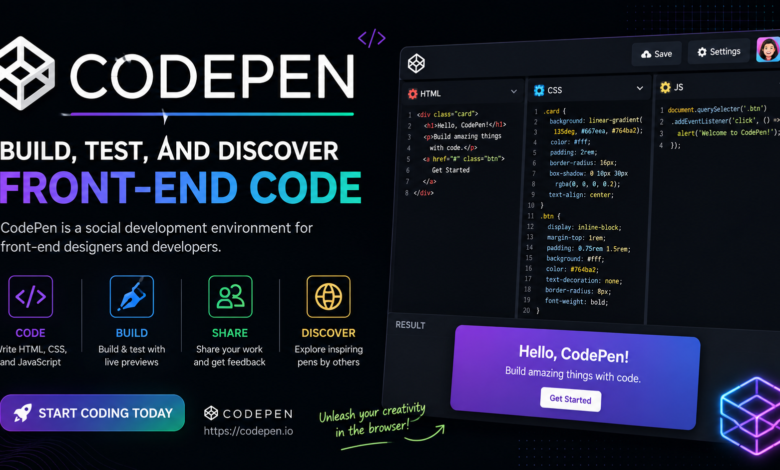
Code.Pen is an online code editor specifically designed for front-end web development. It allows users to write HTML, CSS, and JavaScript in separate panels while displaying the live output instantly. Every project created on the platform is known as a “Pen,” and each Pen can be shared, embedded, or modified with ease.
Unlike traditional IDEs, CodeP.en focuses on simplicity and speed. There is no need to install packages or configure servers before starting a project. Users simply open the editor, write code, and immediately see the results. This workflow makes experimenting with new layouts, animations, and JavaScript functionality incredibly efficient.
Over the years, CodePen has evolved into a massive community where developers showcase creative projects, UI designs, CSS art, animations, and coding experiments. Many developers use it as a portfolio, while others use it as a learning resource by exploring and remixing existing Pens created by experienced programmers.
Why Developers Love CodePen
One of the strongest advantages of CodePen is its live preview functionality. As developers type code, the browser automatically updates the preview without requiring manual refreshes. This real-time feedback significantly speeds up development and helps identify mistakes immediately.
Another reason developers appreciate CodePen is its clean and distraction-free interface. The editor is organized into separate sections for HTML, CSS, and JavaScript, making projects easier to understand and maintain. This structure is especially useful for beginners who are still learning how front-end technologies work together.
CodePen also supports numerous external libraries and frameworks. Developers can quickly include Bootstrap, Tailwind CSS, React, Vue, jQuery, GSAP, and many other popular tools without complex installation processes. This flexibility allows users to experiment with modern technologies in just a few clicks.
Key Features of CodePen
One of the standout features of CodePen is automatic code preview. Every change made in the editor is reflected almost instantly in the output window. This immediate feedback improves productivity and creates a smooth coding experience.
Another impressive feature is asset management. Users can upload images, videos, and other resources for use in their projects. Premium users enjoy additional storage and advanced project organization tools, making it easier to manage larger collections of work.
CodePen also supports project mode, which goes beyond simple Pens. Developers can create multi-file projects with separate HTML, CSS, JavaScript, and asset folders. This makes CodePen suitable for building more complex web applications while maintaining its browser-based simplicity.
Learning Web Development with CodePen
For beginners, CodePen serves as an excellent educational platform. Instead of reading theory alone, learners can immediately practice concepts such as HTML structure, CSS styling, and JavaScript interactions. This hands-on approach accelerates learning and builds confidence.
Students can also explore thousands of public Pens shared by other developers. By examining real-world examples, beginners gain a better understanding of responsive layouts, animations, transitions, forms, and user interface design. They can even fork existing Pens to modify and learn from them without starting from scratch.
Many coding instructors use CodePen during online classes because students do not need to install software. This eliminates technical barriers and allows everyone to focus entirely on learning programming concepts rather than troubleshooting development environments.
CodePen for Professional Developers
Although CodePen is beginner-friendly, professional developers also rely on it extensively. It serves as a rapid prototyping platform where ideas can be tested before implementation in production projects. Instead of creating temporary local files, developers can quickly build interactive components online.
UI and UX designers often collaborate with developers using CodePen. Designers can share interactive interface prototypes while developers refine animations and functionality directly inside the editor. This improves communication between design and development teams.
Freelancers also benefit from CodePen by showcasing their work to clients. Instead of sending screenshots, they can provide live demonstrations of buttons, navigation menus, landing pages, animations, or complete user interface concepts that clients can interact with in real time.
Collaboration and Community
One of CodePen’s greatest strengths is its active global community. Developers regularly publish creative coding experiments, educational examples, and open-source projects. Browsing trending Pens can inspire new ideas and expose developers to modern coding techniques.
Community interaction encourages continuous learning. Users can like, comment on, and fork projects created by others. This collaborative environment allows developers to improve their coding skills while contributing to the broader web development community.
Many companies and technical bloggers embed CodePen examples directly into tutorials. Readers can interact with live code instead of simply viewing screenshots, making educational content far more engaging and practical.
Advantages of Using CodePen
CodePen offers exceptional convenience because everything works inside the browser. There is no software installation, configuration, or server setup required before beginning development. This accessibility makes coding possible from almost any computer with internet access.
Another major benefit is faster debugging. Since changes appear instantly, developers can quickly isolate errors and test multiple solutions without repeatedly refreshing the page. This dramatically improves development efficiency, especially during UI creation.
The platform also supports responsive design testing, external assets, preprocessors like Sass and LESS, JavaScript preprocessors such as Babel and TypeScript, and package integration. These modern development features make CodePen suitable for both educational and professional use.
Limitations of CodePen
Despite its many strengths, CodePen does have some limitations. It primarily focuses on front-end development, meaning complex backend applications requiring databases, authentication systems, or server-side programming cannot be fully developed within the platform.
Another limitation is internet dependency. Since CodePen operates online, developers need a stable internet connection to access projects and save changes. Offline development is not supported in the same way as traditional desktop IDEs.
Large enterprise applications with complicated project structures are generally better suited for dedicated development environments like Visual Studio Code. CodePen works best for components, prototypes, learning exercises, and front-end experimentation rather than complete production-scale systems.
Best Practices for Using CodePen
To get the most out of CodePen, developers should organize their code properly. Using meaningful class names, writing clean CSS, and structuring JavaScript logically makes projects easier to understand and maintain over time.
It is also beneficial to experiment with different frameworks and libraries. Trying Bootstrap, Tailwind CSS, React, GSAP, or Three.js on CodePen allows developers to learn modern technologies without spending time on installation or configuration.
Finally, regularly exploring the community gallery helps developers stay updated with current design trends, animation techniques, accessibility improvements, and innovative coding practices. Learning from experienced developers is one of the fastest ways to improve technical skills.
Conclusion
CodePen has transformed the way developers learn, experiment, and share front-end code. Its browser-based editor, instant live preview, collaborative environment, and extensive community make it one of the most valuable tools available for web developers today. Whether someone is building their first HTML page or creating sophisticated JavaScript animations, CodePen provides an efficient and enjoyable coding experience.
Beyond being a simple online editor, CodePen serves as a global learning platform where creativity meets practical development. Students, educators, freelancers, designers, and professional developers all use it for different purposes, yet they benefit from the same fast and intuitive workflow.
As web technologies continue to evolve, CodePen remains an essential resource for front-end development. Its combination of accessibility, flexibility, collaboration, and innovation ensures that it will continue helping developers build better websites, improve their coding skills, and bring creative ideas to life for years to come.
You May Also Read: Playing Games Blog PlayBattleSquare